 Ship Inspection
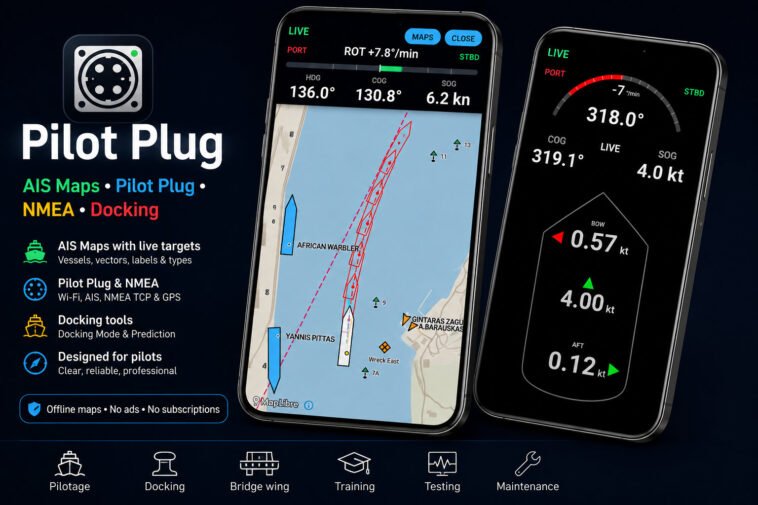
AIS Map, NMEA, docking data viewer for pilots and bridge officers
For years, Android users in the maritime world have watched from the sidelines while a handful of iPad applications dominated the pilot plug space. Connecting a tablet directly to a vessel’s pilot plug to read live AIS data, heading, rate of turn, and docking movement was effectively an Apple-only capability. Until now.
https://play.google.com/store/apps/details?id=com.xshipx.pilotplugviewer
Pilot Plug app is a dedicated Android application that connects to a pilot plug – or any compatible NMEA Wi-Fi source, including a standalone Wi-Fi GPS receiver – and presents live vessel data in a docking mode designed for real maneuvering work. It is now released on Google Play.
Why this matters
Maritime pilots, captains, and ship officers all face the same recurring problem: the most useful navigation data on a ship is often locked to the bridge consoles. On the bridge wing – where engine, thruster, and rudder controls are frequently operated during berthing – the operator may have no direct access to heading, rate of turn, COG, SOG, or precise position.
Pilot Plug app was designed for exactly this gap. With an Android phone or tablet connected to the pilot plug Wi-Fi, the user gets live vessel data wherever they are standing – main bridge, port wing, starboard wing, or anywhere within Wi-Fi range.
What the app shows
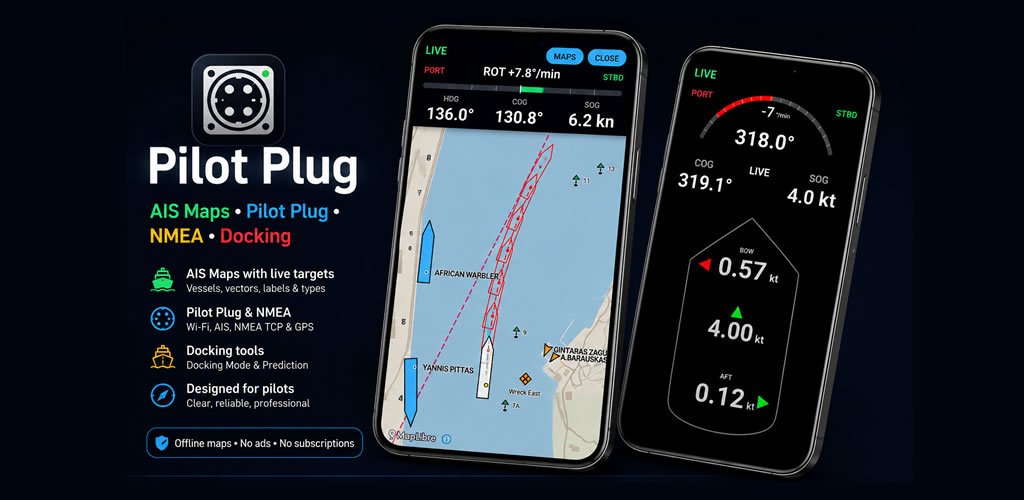
– Live position, COG, SOG, heading, and rate of turn
– Pilot plug, AIS, NMEA TCP, and Wi-Fi GPS/NMEA receiver support
– AIS Map Mode with live external AIS targets
– Vessel outlines, labels, 6-minute vectors, vessel-type colours, dimensions, and antenna-position markers
– Offline World Maritime Overview map
– Support for downloadable regional map packs
– Special NMEA Mode for clean GPS/NMEA monitoring
– FREEZE function for stable position and time snapshots
– Source tagging for AIS, NMEA, and calculated values
– Freshness indicators for live, delayed, or stale data
– Docking Mode with surge, sway, bow sway, and aft sway
– Docking Prediction Mode / Docking Mode B with motion-based vessel projection
– KA motion logic developed from KlaipedaTraffic.lt vessel movement work
– Automatic AIS own-ship detection when static AIS data is available
– Manual ship setup for length, breadth, and GPS antenna offsets
– Selectable AIS and NMEA sources for position and heading
– Presets for Trenz+, Navicom, and KSNTEK, plus manual IP and port entry
– Smoothing and spike filtering for stable docking values
– Built-in user manual and safety information
AIS Map Mode (new update)
AIS Map Mode displays external AIS targets on an offline map. It can show vessel outlines, names, movement vectors, vessel-type colours, available dimensions, and AIS antenna positions.
The built-in World Maritime Overview provides basic offline coverage. Compatible regional map packs can be downloaded separately when available, allowing new areas to be added without replacing the app.
The AIS map is for situational awareness only. Target visibility and accuracy depend on the connected AIS source, received messages, data age, and connection quality.
Docking Mode
The application’s Docking Mode is its core feature, and it is what makes Pilot Plug app genuinely useful during berthing operations.
Docking Mode displays a ship-silhouette view with standard maritime color coding – red for port side, green for starboard – and shows the close-quarters movement that matters during the final meters alongside:
- Surge (forward and astern movement)
- Sway (lateral movement)
- Bow sway
- Aft sway
- Heading
- Rate of turn
Values are stabilized through smoothing and spike filtering so the display behaves predictably rather than jumping with every noisy sentence. Combined with the bridge-wing use case, this turns an ordinary Android device into a portable secondary monitor that supports situational awareness exactly where the pilot or master needs it.
NMEA Mode and the FREEZE function
A separate NMEA Mode provides a simplified view focused on position, time, COG, and SOG. Its standout feature is the FREEZE function – a one-tap capture that holds current values on screen so the operator can record a position into the ship’s logbook without trying to read constantly changing numbers. It is a small detail, but anyone who has tried to write down a coordinate during active maneuvering will immediately understand why it is there.
Beyond the pilot plug – connect a Wi-Fi GPS
Pilot Plug app is not limited to pilot plug connections. The app accepts any compatible NMEA Wi-Fi source, which means a standalone Wi-Fi GPS receiver can be used in place of a ship’s pilot plug.
For situations where a pilot plug is unavailable, on smaller vessels, or when an officer prefers to work from a personal GPS unit, NMEA Mode delivers position, COG, SOG, and time over the same TCP connection – and the FREEZE function works the same way regardless of source. This extends the app’s usefulness well beyond commercial pilotage, to harbour masters, surveyors, crew on smaller vessels, and any maritime user with access to an NMEA-over-Wi-Fi GPS device.
Flexible ship setup
Ship Setup lets the user define vessel dimensions, GPS antenna offsets (from aft and from port side), and choose data sources independently for position, heading, and rate of turn. When the app receives an AIS Type 5 static report from the own vessel, it offers to populate ship dimensions automatically – but the manual setup always remains available for vessels where AIS data is incomplete or unreliable.
Connection presets for common pilot plug Wi-Fi devices (Trenz+, Navicom, KSNTEK, and others) make initial setup quick, and manual IP and port entry is supported for any non-standard configuration.
A note on Android and pilot plug Wi-Fi
Pilot plug networks typically have no internet access. Android, by default, will sometimes prompt to leave such networks and switch to mobile data – which would immediately break the TCP connection to the pilot plug. The app’s documentation addresses this directly and instructs the user to select “Keep connection” when prompted. It is the kind of practical detail that makes the difference between a tool that holds its connection during a real maneuver and one that drops out at the worst possible moment.
Important – what this app is not
Pilot Plug app is a monitoring, training, and situational awareness tool. It is not an approved navigation system. It does not replace ECDIS, radar, gyro, official bridge instruments, visual lookout, bridge team procedures, or professional judgement. Every value it shows must be cross-checked against certified onboard equipment before being acted on. This is stated clearly inside the application and in its user manual.
Availability and pricing
Pilot Plug app is published on the Google Play Store. Pricing follows a simple early-adopter principle: the earlier you buy, the better the price. First users will receive the most favorable pricing tier, with the price rising in stages as the user base grows and additional refinements are released. Pilots, captains, and officers who want to support an independently developed tool built by someone who actually uses it onboard are encouraged to buy early.
In closing
Pilot plug data has been accessible to mariners with Apple devices for some time. With Pilot Plug app, Android users – which on many ships and in many pilot communities is the majority – finally have a dedicated, purpose-built tool of their own. Install it, connect it to a pilot plug, and judge it for yourself.
https://play.google.com/store/apps/details?id=com.xshipx.pilotplugviewer